

SD Card Shows RAW: How to Recover Files Safely in 2026
2026-02-06 15:53:56

How to Prevent Data Loss: 10 Essential Habits for Safe Digital Life
2026-01-07 17:01:59
When Data Recovery Software Works — and When It Doesn’t | FionnShare
2025-12-17 17:01:26
Deleted Files After Emptying Recycle Bin? Here’s How to Restore Them
2025-12-03 15:43:39
Deleted Files After Emptying Recycle Bin? Here’s How to Restore Them
2025-12-03 15:43:39
How to Recover Files After Emptying the Recycle Bin (100% Working Guide)
We’ve all been there: you clear out your Recycle Bin to tidy up your PC, and only afterward does it hit you—you removed something important.
But there’s no need to panic. Even after the Recycle Bin is emptied, those files are often still recoverable. With FionnShare Data Recovery, you can restore them safely and quickly.
This guide walks you through why the files aren’t truly erased and how to recover them step by step.
Where Do Deleted Files Go After You Empty the Recycle Bin?
When the Recycle Bin is emptied, Windows doesn’t erase your files immediately.Instead, it simply marks the space they occupied as “available.”
The data itself remains on the disk until it’s overwritten.
That’s why: The faster you attempt recovery, the higher the success rate.
Use FionnShare Data Recovery to Restore Emptied Recycle Bin Files
FionnShare Data Recovery is a professional recovery solution designed to restore deleted files from:
- Emptied Recycle Bin
- Local disks
- External drives
- SD cards / drones / cameras
- Crashed systems (via bootable USB)
- NAS devices
Key Advantages of FionnShare:
- Recycle Bin Recovery: Restore files even after permanent deletion
- 95%+ success rate: Powered by deep sector-level scanning
- Supports 500+ file formats: Photos, videos, documents, ZIP/RAR, etc.
- Safe, read-only recovery: Ensures 100% data security
- Preview + repair: Fix corrupted photos and videos as you recover
- Beginner-friendly interface: No technical skill required
If recovery is possible, FionnShare will locate the data for you.
How to Recover Files Emptied From the Recycle Bin (Step-by-Step)
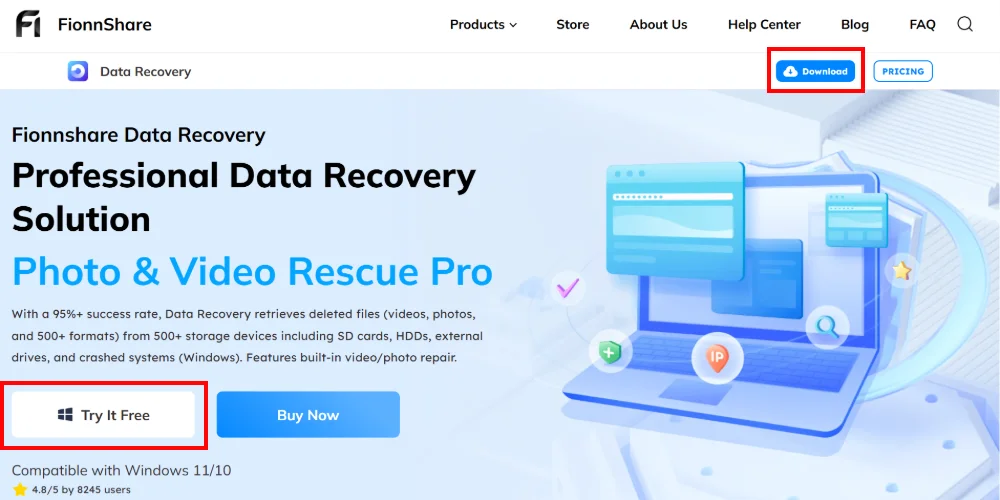
1. Download & Install FionnShare Data Recovery
Download the Data Recovery from the official website.
⚠️ Important: Do NOT install it on the same drive where the deleted files were stored.
2. Select File Types You Want to Recover
Choose from:
- Photos
- Videos
- Documents
- Audio
- Compressed files (ZIP/RAR)
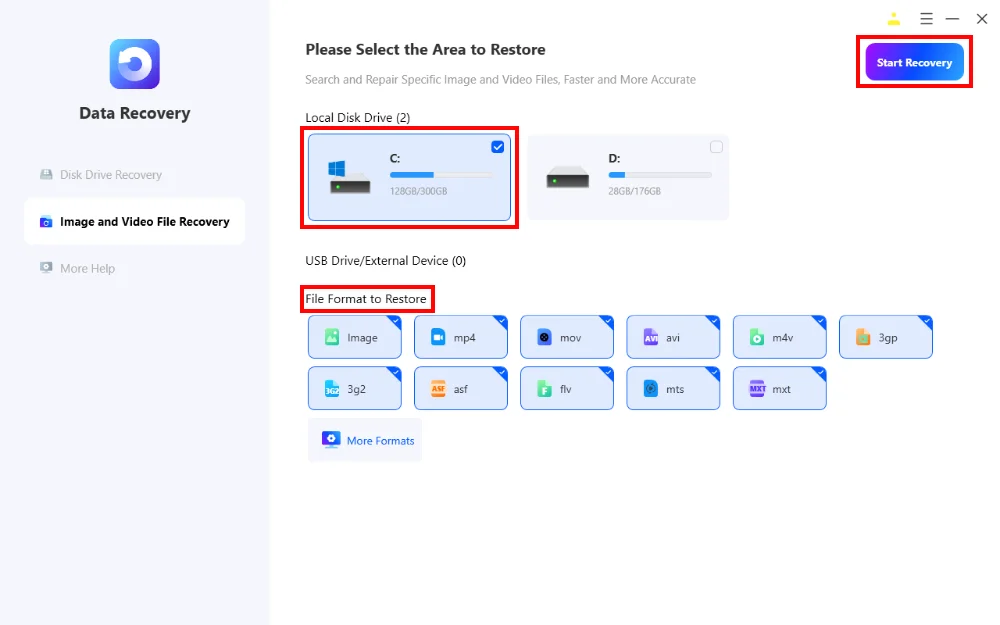
3. Select the Disk to Scan
Files deleted from the Recycle Bin usually come from: Local Disk Drive (C:)
Select the correct drive before scanning. Then, click Start Recovery.
4. Preview and Recover Your Files
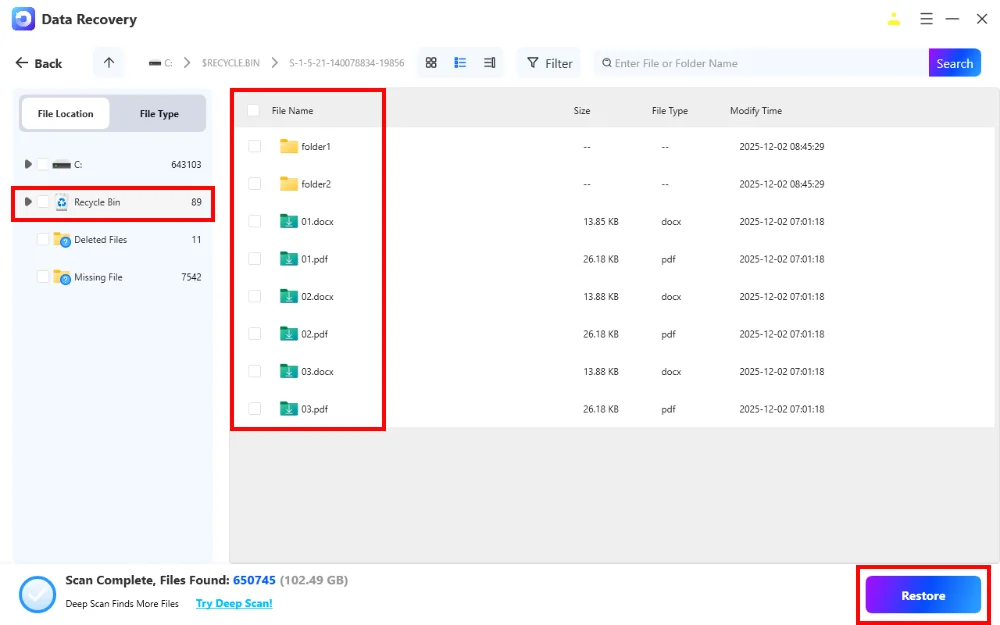
Once the scan finishes:
- Browse all recoverable files
- Preview photos, videos, and documents
- Select the items you want
- Click Restore
Your files will be safely restored.
Tips to Prevent File Loss in the Future
- Enable cloud backup (OneDrive/Google Drive)
- Check the Recycle Bin before emptying it
- Keep FionnShare installed for emergency recovery
Final Thoughts: Deleted Doesn’t Mean Lost
Accidentally emptying the Recycle Bin is stressful, but your files are rarely gone forever.
With FionnShare Data Recovery, recovering them is simple, safe, and highly effective.
Your files aren’t lost—they’re just hidden. And FionnShare knows exactly how to bring them back.


 Fionn
FionnCopyright © 2026 Wonderful Apps Limited.
 English