

SD Card Shows RAW: How to Recover Files Safely in 2026
2026-02-06 15:53:56

How to Prevent Data Loss: 10 Essential Habits for Safe Digital Life
2026-01-07 17:01:59
When Data Recovery Software Works — and When It Doesn’t | FionnShare
2025-12-17 17:01:26

Deleted Files After Emptying Recycle Bin? Here’s How to Restore Them
2025-12-03 15:43:39
SD Card Shows RAW: How to Recover Files Safely in 2026
2026-02-06 15:53:56
SD Card Shows RAW: How to Safely Recover Files (2026 Complete Guide)
Summary (TL;DR)
When an SD card shows as RAW, it usually means the file system is damaged and the operating system can no longer recognize it. This does not mean your data is gone. As long as the data has not been overwritten, you can recover most files using the standard “Image → Scan → Recover to another device” workflow.
Critical rules: Do not format the card. Do not run chkdsk.
1. What Does “SD Card Shows RAW” Mean?
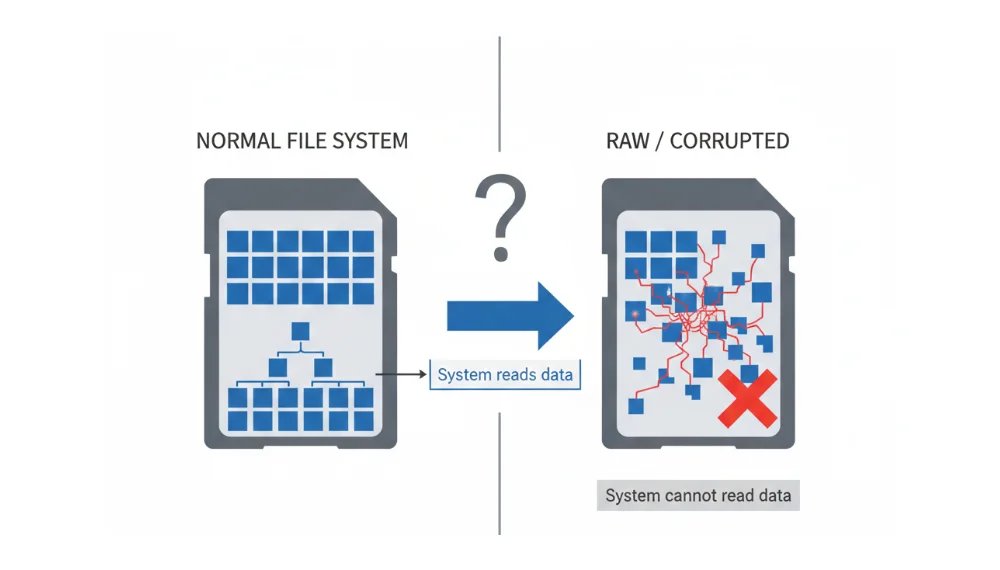
RAW is not a real file system. It is a status displayed by Windows, macOS, or cameras when the system cannot interpret the partition structure of a storage device.
In simple terms:
- Your files are still physically stored in the SD card’s NAND memory.
- But the “map” (file system metadata like FAT, exFAT, or NTFS) is damaged.
- The system no longer knows where each file starts or ends.
That’s why the card appears empty, inaccessible, or asks to be formatted — even though the actual data is still there.
2. Common Reasons Why an SD Card Becomes RAW
The most frequent causes include:
Abnormal power loss (most common)
Removing the SD card while it’s still being written to, or sudden power loss during recording.
File system metadata corruption
Damage to Boot Sector, FAT, or MFT tables.
High-load device shutdown (2026 scenario)
Modern smartphones and cameras use heavy AI processing for photos and video. If the device shuts down before cached data is fully written, partition errors can occur.
Flash memory wear or bad blocks
After many write cycles, the controller may fail to rebuild the logical mapping table.
3. What You Must NOT Do When an SD Card Is RAW
This step determines whether recovery succeeds or fails.
Do not format the card
Formatting overwrites file system structures and drastically reduces recovery success.
Do not run chkdsk
chkdsk tries to “fix” logical structures by rewriting them, which often destroys recoverable file links.
Do not write new data
Do not take new photos, copy files, or let the system auto-repair.
One-sentence rule: RAW card = read only, no repair, no writing.
4. 2026 Industry-Standard Recovery Workflow
Professional data recovery labs follow the same core process worldwide.
Step 1: Create a Byte-to-Byte Image
Before scanning, always clone the entire SD card into a disk image.
Why this matters:
- Prevents further hardware damage
- Allows multiple recovery attempts
- Even if the card dies, you still have a full copy
You can use professional recovery tools like Data Recovery to create a sector-by-sector image of the RAW SD card safely.
Step 2: Deep Scan (RAW Scan)
Modern recovery software no longer relies only on file systems.
Instead, it scans raw data blocks and identifies files by their internal headers.
In 2026, advanced engines can recognize:
- JPEG / HEIC / ProRAW photos
- MP4 / MOV / ProRes videos
- Documents, archives, project files
This process reconstructs files directly from NAND memory.
Step 3: Recover to Another Location
Recovered files must be saved to:
- Your computer’s hard drive
- External SSD
- NAS or cloud storage
Never write recovered data back to the same SD card.
5. Can a RAW SD Card Always Be Recovered?
Logical damage (≈99% recoverable)
Examples:
- Partition table errors
- File system corruption
- Accidental deletion without overwrite
These cases are fully solvable with software like Data Recovery.
Physical damage (lab required)
Examples:
- Burned controller chip
- Broken NAND solder joints
- Electrical failure
These require clean-room chip-level recovery.
6. How to Prevent SD Cards from Becoming RAW Again
Prevention is far cheaper than recovery.
Use the 3-2-1 Backup Strategy
- 3 copies of important data
- 2 different storage types
- 1 offsite location
You can learn more in our internal guide: How to Prevent Data Loss: 10 Essential Habits for Safe Digital Life.
Format in Device, Not on Computer
Always format SD cards inside the camera or device that uses them. This triggers:
- Garbage collection
- Bad block remapping
- Proper file system initialization
Use High-Endurance SD Cards
Choose cards labeled:
- Endurance
- Industrial
- Professional grade
They are designed for frequent write cycles.
Enable Write Protection on Public Devices
When using unknown computers or card readers, enable physical or software write protection.
7. Frequently Asked Questions (FAQ)
1. Can I fix a RAW SD card back to its original file system?
Yes, but only after recovering your data. Formatting repairs the file system but erases file references.
2. Can I recover files after formatting?
Sometimes, yes — but success rates drop significantly.
3. Is RAW on Mac different from Windows?
No. The concept is identical. Only the system message differs.
4. RAW vs Unallocated — what’s the difference?
- RAW means the system sees a partition but can’t read it.
- Unallocated means the partition itself is missing.
Final Thoughts
An SD card showing RAW is not a disaster — it’s a logic error, not data death.
As long as you follow the correct order:
- Image first
- Scan second
- Recover elsewhere
You avoid the two biggest killers of data recovery: formatting and blind repairs.
With modern recovery tools like Data Recovery, most RAW SD cards in 2026 can be recovered safely, even without technical expertise.


 Fionn
FionnCopyright © 2026 Wonderful Apps Limited.
 English