 Emily CarterAuto Clicker
Introduction
If you need a Minecraft building auto clicker, start with a tool that matches your platform and the rules of the specific server.
For Windows users who need separate left- and right-button settings plus hold or toggle modes, AutoClicker is the most direct option. CitronClicker is worth considering for Bedrock or Java players who need explicitly documented independent button configuration. None of these tools overrides server rules: use automation only where it is allowed.
Best Options by Scenario
- AutoClicker — the first option for building on Windows: its developer explicitly lists Minecraft building as a use case and documents separate left/right button settings, keyboard or mouse bindings, and hold or toggle modes.
- CitronClicker — an alternative for Bedrock and Java when independent left- and right-click configuration matters; macOS and Linux have system requirements.
- Fionn Auto Clicker — a Windows option for configuring the button, position, interval, and repeat count for extended block placement; unlimited clicks are included with membership.
- OP Auto Clicker — a general option for clicking at the cursor or a fixed point on several supported platforms, but Minecraft edition compatibility is not stated.
Quick Comparison Table
The key distinction is whether you need independent button controls and hold/toggle operation, or simply repeat clicks at a chosen position.
Fionn Auto Clicker
Fionn Auto Clicker is worth considering for a Windows player who needs to set the button, position, interval, and number of repeats for extended block placement, then start and stop the process with a hotkey.
The tool supports the left, middle, and right buttons, the current or a fixed position, intervals, cycles, and hotkeys. Keyboard and mouse action recording and playback are also stated for tasks beyond simple clicking, but regular clicking is sufficient for building.
Best for Windows users who need configurable extended block placement and have checked that automation is permitted on the server.
How to Use It
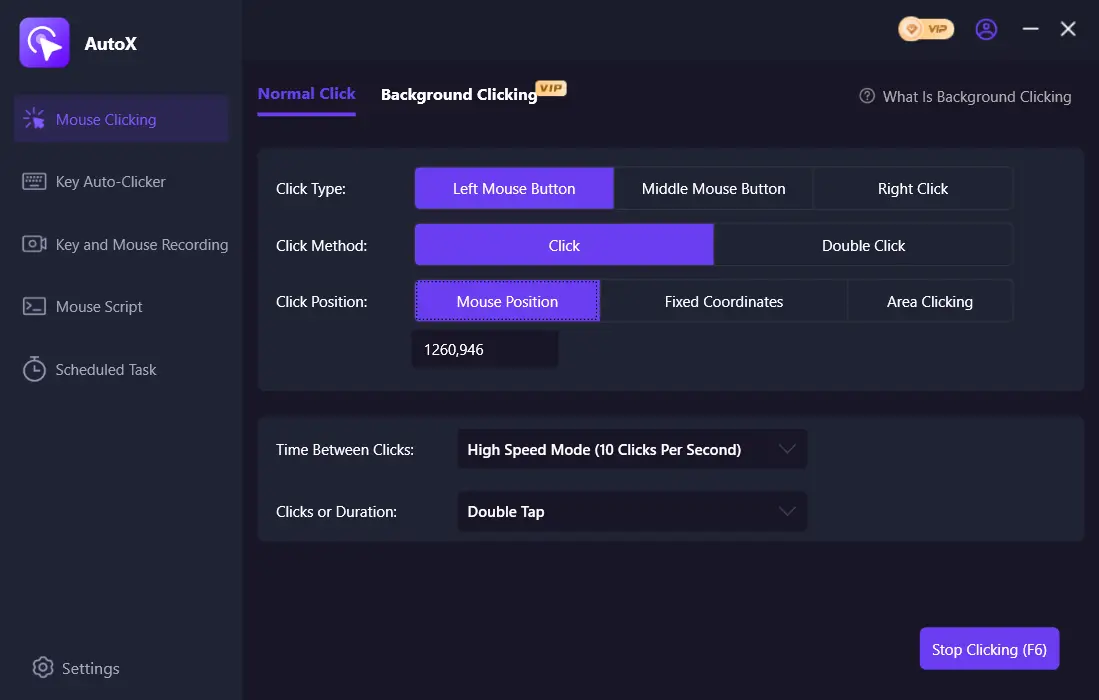
- Open Fionn Auto Clicker and select “Mouse Clicks” > “Regular Click.” Choose the mouse button, click method, and click position, set the interval and repeat settings, then press the auto-click start button or F6.
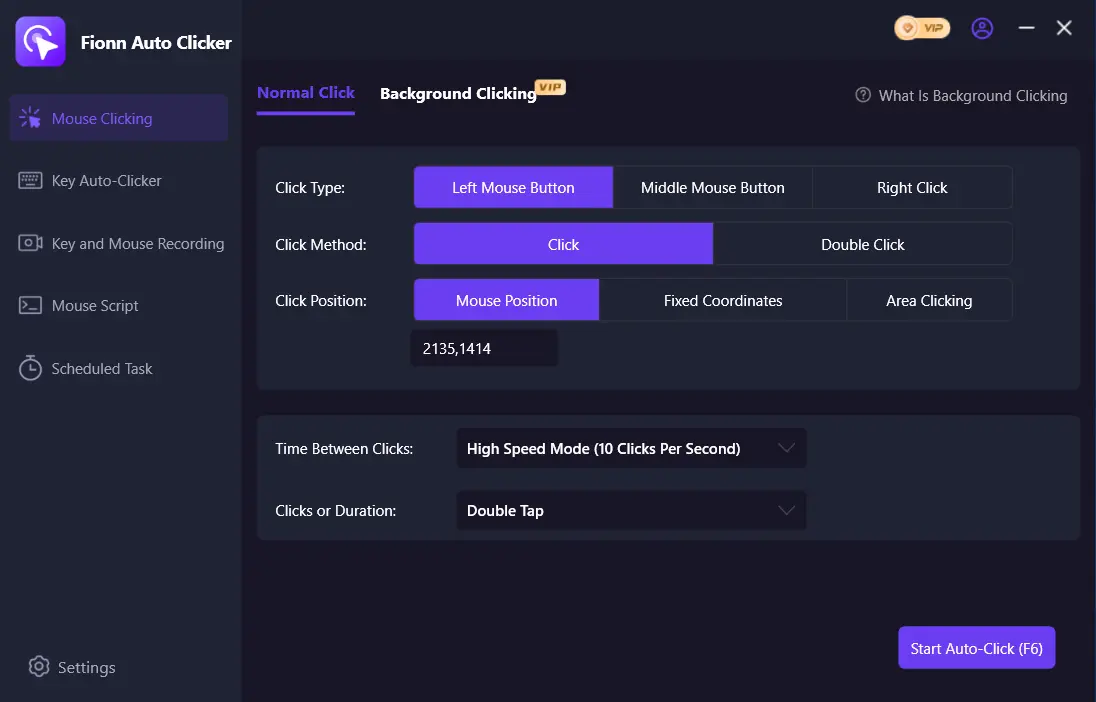
- After checking that the sequence works, stop regular clicking with the stop button or F6. Make sure automatic clicking has stopped before moving the pointer or changing settings.
Official product page: Fionn Auto Clicker .
CitronClicker
CitronClicker makes sense for Bedrock or Java when explicitly stated independent left- and right-click settings are the deciding factor.
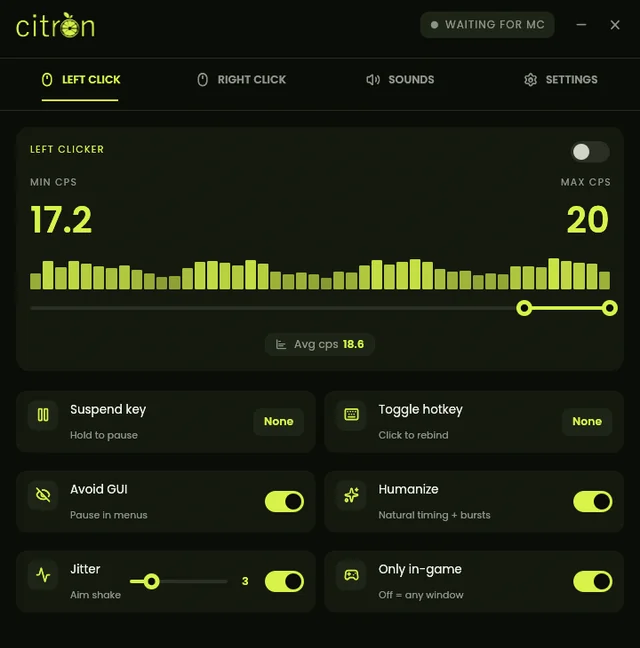
This open-source project is built with Rust and documents separate configuration for the left and right buttons, along with sound and general settings.
Suitable for Bedrock or Java users prepared to meet the system requirements of their chosen operating system.
Learn more: official CitronClicker page .
AutoClicker
AutoClicker is the most direct choice for building on Windows when you need separate button settings and hold or toggle operation.
Its documentation describes separate settings for left and right clicks, keyboard or mouse bindings, toggle and hold modes, and minimum and maximum CPS.
Suitable for Minecraft builders on Windows in permitted contexts, especially when separate button settings and hold control matter.
Source: official AutoClicker repository .
OP Auto Clicker
Choose OP Auto Clicker for general extended clicking at the current cursor or a fixed position when independent left- and right-button configuration is not essential.
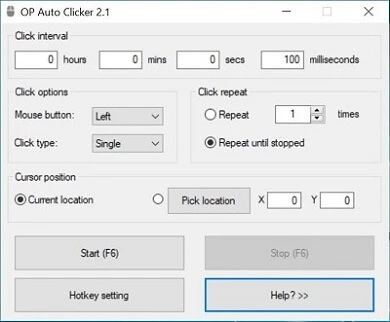
It offers button and click-type selection, operation at the cursor or a chosen point, a finite or unlimited number of clicks, and configurable background hotkeys.
Suitable for people who need general continuous clicking at the pointer or a point while following server rules.
Source: official OP Auto Clicker website .
How the Tools Were Compared
The comparison uses developer-stated information on operating systems and Minecraft editions, button and hotkey controls, suitability for extended block placement, the license or access model, installation requirements, and anti-cheat position. Unstated capabilities were not treated as supported.
How to Choose
Start with your platform. For Bedrock or Java with independent button configuration, consider CitronClicker, while accounting for macOS/Linux requirements. On Windows, if you want hold or toggle operation and an explicitly stated building use case, start with AutoClicker. If you need to set the button, position, interval, and repeat count through a simple regular-click mode, Fionn Auto Clicker may fit. For fixed-point clicking across several stated operating systems without a confirmed Minecraft connection, OP Auto Clicker remains an option.
Final Verdict
For Minecraft building on Windows, consider AutoClicker first: its building use case, separate button settings, and hold/toggle modes are explicitly stated. Choose CitronClicker if you play Bedrock or Java and can meet the platform conditions. Fionn Auto Clicker suits configurable extended placement on Windows, but account for the three free trials and membership for unlimited clicks. Choose OP Auto Clicker for general clicking at the cursor or a point, recognizing that Minecraft compatibility and anti-cheat support are not stated.
Frequently Asked Questions
Can I use an auto clicker on a multiplayer Minecraft server?
Only if the specific server's rules allow automation. AutoClicker specifically states that it is not intended to bypass anti-cheat in protected multiplayer games; anti-cheat compatibility is not confirmed for the other options.
Which option is confirmed for Minecraft Bedrock and Java?
CitronClicker explicitly states support for Minecraft Bedrock and Java. For the other candidates, compatibility with particular editions is not confirmed in the available information.
Which auto clicker provides separate left- and right-button settings?
CitronClicker and AutoClicker explicitly document independent left- and right-button configuration. Fionn Auto Clicker supports the left, middle, and right buttons, but separate configuration for each button is not stated.
Does AutoClicker require installation?
According to its official description, AutoClicker is distributed as a standalone executable and does not require installation or Python.
What is limited in Fionn Auto Clicker without membership?
Three free trials are available; unlimited clicks are a membership benefit.


