

Best Anime Wallpapers of 2025: HD, Aesthetic, and All Styles
2025-12-01 09:26:46
Turn TikTok & YouTube Videos into Live Desktop Wallpapers | WallpaperX Tutorial
2025-11-26 13:04:49

Bring Your Desktop to Life with WallpaperX | Beginner 4K Dynamic Wallpaper Guide
2025-11-25 13:17:18
Live Wallpapers Guide 2025 | WallpaperX for Smooth 4K Desktop Animations
2025-11-19 14:57:58

Wallpaper X - Steam Dynamic Wallpaper App | Interactive Desktop Tool
2025-10-15 17:11:36
Bring Your Desktop to Life with WallpaperX | Beginner 4K Dynamic Wallpaper Guide
2025-11-25 13:17:18
Bring Your Desktop to Life with WallpaperX (Beginner 4K Dynamic Wallpaper Guide)
Your desktop doesn’t have to stay still.
The most important and easiest-to-understand feature of WallpaperX is this:
👉 It lets you set videos as your desktop wallpaper — making your screen move.
Any video you like can become your live wallpaper:
game clips, anime loops, nature timelapses, cyberpunk visuals, or your own recordings.
In this beginner-friendly guide, you’ll learn:
✔ How to install WallpaperX
✔ How to use 4K dynamic & static wallpapers
✔ How to import your own videos or images
✔ How to customize your desktop with cursor & icon themes
✔ How to use wallpaper playlists for auto-rotation
What Is WallpaperX? (Simple Definition)
WallpaperX lets you turn videos into your desktop wallpaper — making your screen truly dynamic.
It also supports:
- 4K live/static wallpapers
- Cursor customization
- Windows software icon customization
- One-click import of local video/image files
Step 1: Install & Launch WallpaperX
- Download and install WallpaperX from the official website.
- Launch the app - the interface is clean and intuitive.
- Log in or browse freely to explore wallpapers.
- Home page includes trending 4K wallpapers from creators worldwide
Step 2: Choose Your Perfect Wallpaper (Live or Static)
Browse categories like anime, sci-fi, minimalism, nature, and more.
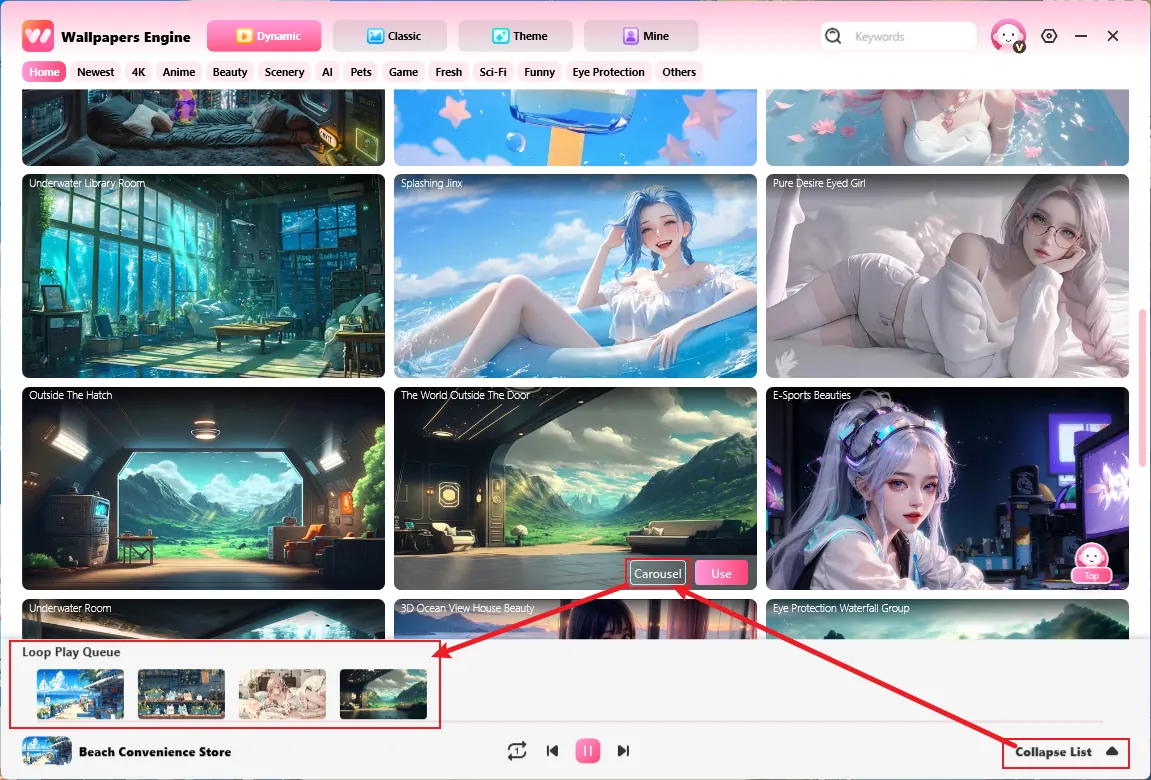
- Click any wallpaper to apply it instantly
- You can also create a Wallpaper Collapse List: add multiple dynamic or static wallpapers
- Set rotation time and WallpaperX will automatically switch them
Your desktop stays fresh with zero effort.
Step 3: Import Your Own Wallpapers (The Core Feature!)
Didn’t find what you want?
Import your own video or image in seconds:
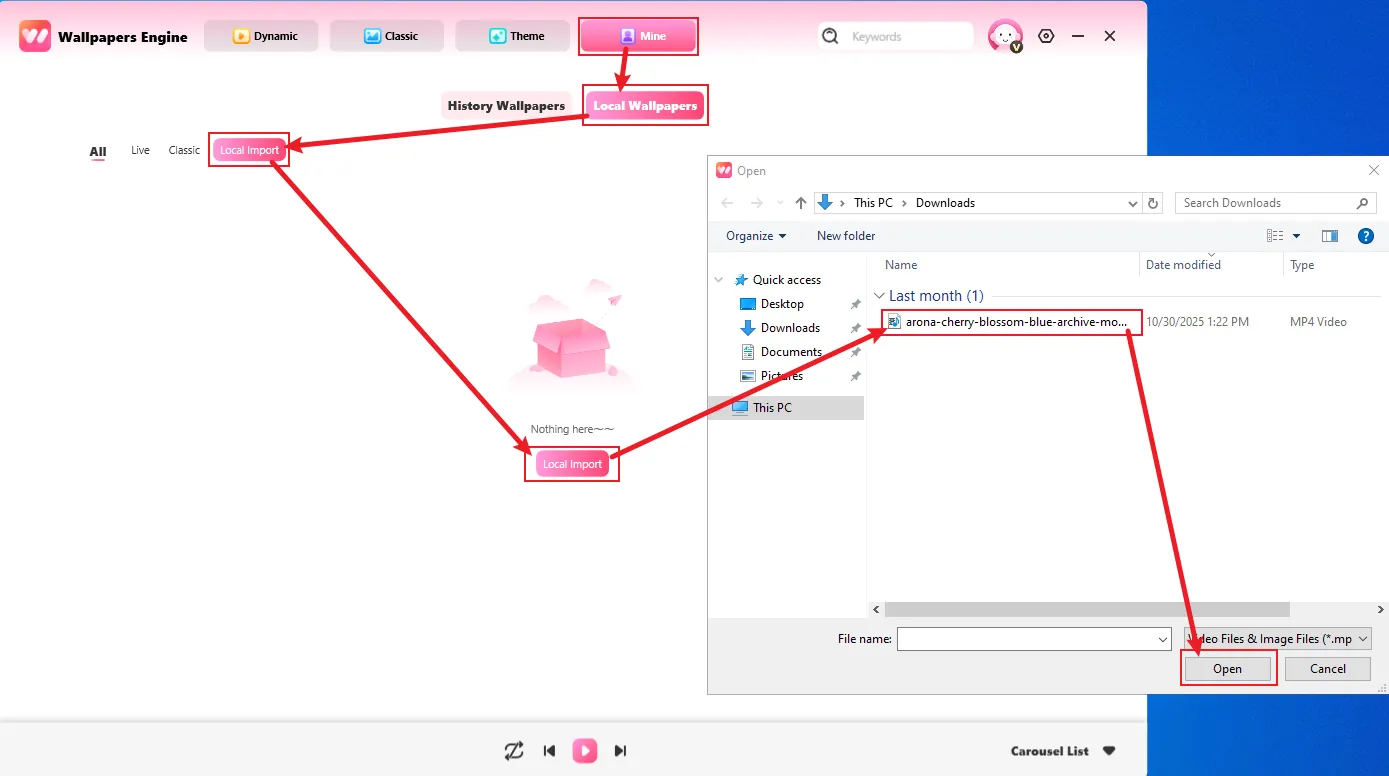
- Go to “Mine” → “Local Wallpapers” → “Local Import”
- Select a video file (MP4, MOV) for dynamic wallpaper
- Or select an image file (JPG, PNG) for static wallpaper
- Click Use — it instantly appears on your desktop
No extra software, just one-click customization.
Step 4: Make It Truly Yours (Cursor & Icon Customization)
To give your desktop a more cohesive aesthetic, try customizing:
- Mouse cursor icons
- Windows app icons
This makes your setup more unified and personal.
Pro Tips
- Use 4K wallpapers for best clarity
- Live wallpapers work best on mid- to high-end GPUs (GTX 1050+)
- Pause the wallpaper collapse list during gaming for performance
- Create style-based playlists: anime, minimalist, nature, neon, cyberpunk
Final Thoughts
WallpaperX makes your desktop come alive by letting you turn videos into wallpapers.Whether you’re a designer seeking inspiration, a gamer building an aesthetic setup, or someone who just wants to refresh their PC, WallpaperX is your go-to tool.
🎨 Your desktop deserves to move — WallpaperX makes it happen.


 Fionn
FionnCopyright © 2026 Wonderful Apps Limited.
 English